IaaS, PaaS and SaaS are the three service models of cloud computing. They differ in what the provider manages for you: the infrastructure (servers, storage, networking) for IaaS, the development and runtime platform for PaaS, and the complete, ready-to-use application for SaaS. The further you move toward SaaS, the less technology you manage yourself.
Key takeaways
- IaaS: the provider rents out raw resources (compute, storage, networking); you manage the operating system, middleware, applications and data.
- PaaS: the provider also manages the operating system and middleware; you deploy your own code and manage your data.
- SaaS: the provider delivers a complete application; you manage users, data and how the software is used.
- Whatever the model, your data, user accounts and access rights remain your responsibility.
The rapid expansion of new information technologies has, over time, given rise to new computing paradigms that profoundly disrupt established practices. Among these disruptive concepts, the cloud architectures have become standard among businesses looking to fully leverage the capabilities offered by outsourcing infrastructure and services. This new paradigm promotes the outsourcing of IT systems to remote servers via the internet. It includes three main service categories: IaaS, PaaS, and SaaS.
While these acronyms are often mentioned, it's difficult for the less experienced among us to understand them clearly. What are the specific characteristics of each? How do they differ?
Definition of IaaS
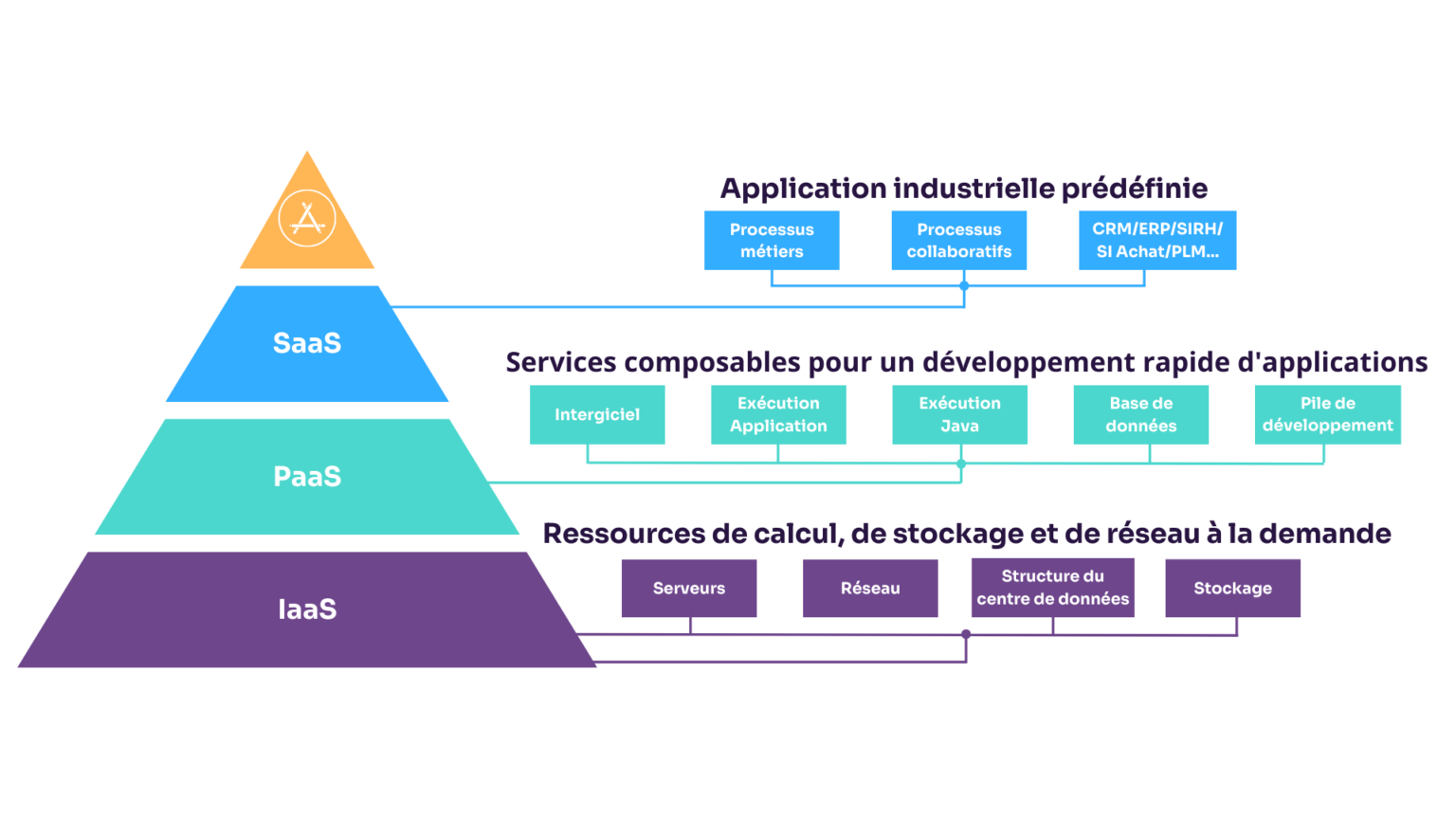
The acronym IaaS stands for "Infrastructure as a Service". Behind this term lies a very simple concept: it involves providing a client with raw computing resources, typically hosted in the cloud.
Specifically, an IaaS provider offers storage capacity on remote servers, computing power, and RAM. The client can then deploy their own pre-configured virtual machines (VMs) on this outsourced infrastructure.
They retain control over the configuration of the software layer, with full control.
The main advantages of the IaaS model lie in:
- Usage flexibility: the company can configure and adjust the virtual resources allocated to it as needed, based on its requirements.
- Elasticity: thanks to virtualization, the company can scale and adjust the capacities made available to it on demand, to cope with fluctuations in activity.
- Cost optimization: Outsourcing infrastructure to the cloud eliminates the costly capital and operational expenditures associated with acquiring and maintaining physical servers.
Regarding use cases, IaaS excels for application development, with rapid deployment. It is also suitable for temporary projects requiring high scalability. Major players like Amazon Web Services or Microsoft Azure have popularized this cloud consumption model.
PaaS Definition
The acronym PaaS stands for "Platform as a Service". This time, the cloud provider offers the client not just raw resources, but a application platform complete.
In practice, a PaaS provider supplies server infrastructure, the operating system, middleware, and application management features. The client only needs to deploy their own application code on the platform, thus retaining control over their data and business logic.
The main advantage of PaaS is that it simplifies and accelerates development. Several services are natively integrated, for example:
- Databases
- Message queues
- Authentication
- Cache
- Etc.
Theweb and mobile application hosting is the preferred use case for PaaS. It is also used for creating APIs or ready-to-use data integration pipelines.
SaaS Definition
The acronym SaaS stands for "Software as a Service". It refers to the most complete model of cloud computing. Indeed, with SaaS, the provider makes a complete and operational application available, accessible online.
Here, the client doesn't have to worry about the underlying infrastructure or updates. All they need is an internet connection to use the software and access their data from anywhere.
SaaS applications are frequently accessible from a web browser, as well as mobile or desktop apps.
Themain advantage of SaaS lies in its deployment simplicity. The client avoids the installation and infrastructure projects typical of on-premises solutions; user support and change management remain essential. Billing is generally based on a subscription, most often per user; pay-as-you-go billing based on actual consumption is more typical of IaaS.
You can find SaaS applications in most business sectors: corporate communication, commercial management, finance, HR, etc.
A French software publisher since 2001, Knowmore supports change management towards SaaS in large enterprises. Our software suite K-NOW for digital adoption guides users directly inside their business applications.
Differences between the models
IaaS, PaaS, and SaaS each have their specific characteristics. It's important to understand their differences before making a choice. The table below summarizes the main comparison points:
We can see that the more control and responsibility shift towards the cloud provider, the simpler the solution is for the client to use. IaaS offers maximum flexibility, while SaaS allows for accelerated but more constrained implementation. PaaS positions itself as a good balance suitable for application projects.
Who manages what in IaaS, PaaS and SaaS?
The clearest way to tell the three models apart is to look at which layers you still manage. The table below follows the split described by Google Cloud, compared with running software on your own servers (on-premises).
| Layer | On-premises | IaaS | PaaS | SaaS |
|---|---|---|---|---|
| Data, user accounts and access rights | You | You | You | You |
| Application | You | You | You | Provider |
| Middleware and runtime | You | You | Provider | Provider |
| Operating system | You | You | Provider | Provider |
| Virtualization, servers, storage, networking | You | Provider | Provider | Provider |
Typical users differ accordingly: system administrators and DevOps teams work with IaaS, developers with PaaS, and business users with SaaS. Pricing follows the same logic: IaaS is generally billed by consumption (compute time, storage, network traffic), while SaaS is most often sold as a subscription per user.
Two lessons follow. First, whatever the model, your data, accounts and access rights remain your responsibility: moving to the cloud does not transfer that obligation. Second, the closer you get to SaaS, the more the effort shifts from technology to usage: configuration, access governance and user support become the real workstreams.
Market examples of SaaS, PaaS, and IaaS
After theorizing these concepts, it's time to illustrate them with concrete examples from the current cloud ecosystem.
For IaaS, AWS, Microsoft Azure, and Google Cloud are the leading providers. They let companies host their IT systems flexibly and at scale.
Regarding PaaS, the most widely adopted platforms are AWS Elastic Beanstalk, Heroku, and RedHat OpenShift. They let teams develop and run business applications without managing servers.
On the SaaS front, the behemoths like Salesforce, Microsoft 365, and Google Workspace equip a myriad of businesses, from SMEs to large corporations.
These key examples show that cloud computing has permeated all sectors. Its flexibility adapts to the challenges faced by businesses of all sizes through IaaS, PaaS, and SaaS.
IaaS vs PaaS vs SaaS: which one should you choose?
The right model depends less on technology than on what you want to control.
- Choose IaaS if you need control over the operating system and configuration, want to migrate existing applications without rewriting them, or must absorb occasional load peaks. You will need teams able to administer servers, networks and security.
- Choose PaaS if you build your own applications and want developers to focus on code, without managing servers or middleware.
- Choose SaaS if standard software covers your business need (CRM, HRIS, ERP, collaboration) and you accept adapting your processes to its features.
In large organizations, the three coexist: a SaaS ERP, custom applications on a PaaS, legacy applications on IaaS. Deciding which workloads go where is a matter of IT governance. With SaaS, the main risk is no longer technical but related to usage: new releases arrive several times a year and change screens and workflows. Plan software onboarding for users at launch and again at each major release.
Conclusion
Thus, IaaS, PaaS, and SaaS embody the democratization of cloud computing. These methods of consuming virtualized IT resources have spread throughout the IT systems of businesses of all sizes.
However, these alternatives are not mutually exclusive. We are witnessing a growing convergence of cloud platforms, integrating multiple delivery models. This hybridization increases companies' freedom of choice to develop a tailored strategy based on their use cases.
The underlying trend is clear: cloud technology is rapidly permeating the core information systems of public and private organizations. It has become integral to their digital agility, constantly adapting to market changes.
At Knowmore, we are rethinking the use of enterprise applications by combining learning and user experience within our next-generation SaaS solutions. Whatever your industry and business challenges, we help you optimize the adoption of your CRM, ERP, HRIS, or collaboration suites in cloud mode.
Frequently asked questions
What is the difference between PaaS and SaaS?
PaaS provides an environment to build and run your own applications: the provider manages servers, the operating system and middleware, and you write the code. SaaS provides an application that is already built and ready to use, which you configure without programming. PaaS mainly serves development teams, while SaaS serves business users.
Is Microsoft 365 SaaS, PaaS or IaaS?
Microsoft 365, which includes Outlook, Teams, Word and Excel online, is SaaS: the application is delivered ready to use. Microsoft Azure, on the other hand, is a cloud platform that offers both IaaS, such as virtual machines, and PaaS, such as application hosting services. A single provider can therefore cover all three models with separate offerings.
Is ChatGPT SaaS or PaaS?
ChatGPT, used in a browser or app with a subscription, is SaaS: OpenAI runs the whole stack and you only manage your account and data. Developers who call OpenAI's models through its API to build their own applications use a platform-type service, closer to PaaS. As with Microsoft, one provider sells several cloud service models.
What are CaaS and FaaS?
They are finer-grained variants of the three main models. CaaS (Containers as a Service) provides a managed environment to deploy and run containers, between IaaS and PaaS. FaaS (Functions as a Service), often called serverless, runs small functions triggered by events, with the provider scaling them automatically and no server for you to administer.
How do IaaS, PaaS and SaaS relate to public, private and hybrid cloud?
They are two separate dimensions. IaaS, PaaS and SaaS describe the level of service delivered; private, community, public or hybrid cloud describe the deployment model, that is, who shares the infrastructure. The NIST definition distinguishes three service models and four deployment models, so a company can, for example, consume IaaS in a private cloud.