A digital adoption platform (DAP) supports IT teams by bringing self-service help directly into business applications: step-by-step guides, tooltips, role-based walkthroughs and usage analytics. Simple "how do I" questions get answered without a ticket, which lightens tier 1 support and lets the service desk focus on complex incidents and improvements.
Key takeaways
- A digital adoption platform (DAP) delivers contextual help inside applications: guides, tooltips and personalized walkthroughs.
- It turns many "how do I" questions into tier 0 self-service, which reduces the load on tier 1 support.
- DAP analytics show where users get stuck, so support teams can fix root causes instead of answering the same tickets.
- Measure the impact by comparing the volume and type of tickets before and after deployment, application by application.
Even today, thedigital adoption of enterprise applications by employees remains the Achilles' heel of many organizations. However, increasing the usage rate of digital tools is crucial for optimizing technological investments. So, how can IT departments effectively support end-users? The solution lies in deploying a Digital Adoption Platform (DAP), a true ally for technical support. Let's examine in more detail how this technology tangibly enhances the day-to-day work of IT teams, while facilitating software adoption by employees.
Key Features of a Digital Adoption Platform
A platform for digital adoption brings together several features designed to facilitate the adoption of digital tools in businesses. Let's detail the most useful components for assisting IT support.
Interactive Guides and Tutorials within Applications
First, the DAP allows for the creation of user guides and tutorials directly accessible within software interfaces. Specifically, pop-up windows appear to explain step-by-step procedures, whether in the form of text, screenshots, animated GIFs, or videos.
The benefit for technical support? These integrated training resources reduce level 1 support requests. Employees gain autonomy in performing their daily tasks thanks to contextual assistance.
Contextual Tooltips
Tooltips display definitions or instructions when hovering over the designated element. When applied to application interfaces, they clarify certain buttons, icons, or areas, preventing questions.
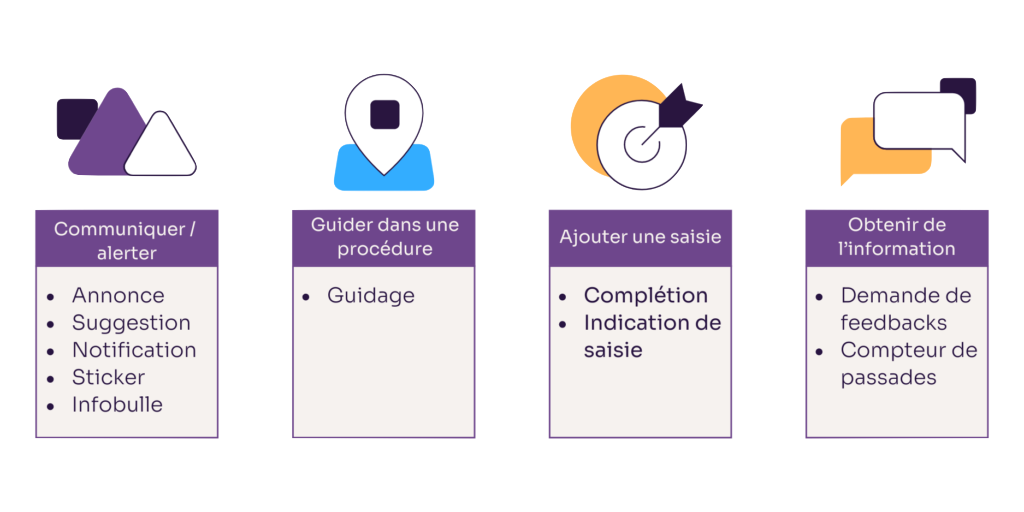
The DAP also integrates other equally useful digital assistants:
- Input assistance (autocompletion, input prompts): facilitates filling complex fields.
- Feedback: reinforces positive validations or flags errors.
- Notifications: provides real-time updates on news and new features.
- Stickers: visually highlights major innovations within screens.
- Links: inserts direct hyperlinks to user documentation.
This helps clarify doubts in real-time, directly within the workflow, without needing to contact technical support or consult lengthy documentation.
Personalized User Journeys
The digital adoption platform also integrates a scenario engine that allows for the creation of interactive journeys tailored to each user profile. In practice, this involves sequencing training steps that precisely match employees' needs.
For example, a salesperson will be offered a tutorial dedicated to creating quotes or tracking their objectives in the ERP. An accountant will access a journey explaining ledger reconciliation or bank reconciliation procedures in the financial application.
Several customization options are available to administrators:
- Filter content by roles, departments, or applications employees have access to.
- Differentiate complexity levels based on individual skill sets.
- Display walkthroughs following interface updates or functional enhancements.
- Make certain tutorials mandatory before users can access sensitive modules.
By offering only relevant content, users more effectively master the features essential for their role. They gain autonomy more quickly on essential tasks.
Analytics to identify sticking points
Digital adoption platforms are also equipped with tracking features that allow for detailed analysis of user behavior. Consequently, all content guidance is instrumented to collect usage data:
- Tutorial viewing rate;
- Time spent on each step;
- Clicks on different interactive elements;
- Sequences of actions before abandonment;
- Frequently asked questions…
With these indicators, support teams have precise information on the difficulties encountered within applications. They can thus identify friction points or misunderstandings.
Furthermore, it is by no means about monitoring employees' work, but rather about understanding the blockages.
How do you measure a DAP's impact on IT support?
Analytics are a core capability of digital adoption platforms: Gartner lists usage analytics among the mandatory features of the category, alongside in-application contextual guidance and surveys. Use them to check that the DAP really relieves your support team. Track these indicators application by application:
- Tier 1 tickets per user, especially the share of "how do I" requests.
- Tickets after each release: the usual spike should shrink when changes come with in-app guides.
- Self-service resolutions: guide or tooltip views on screens that used to generate tickets.
- Average resolution time of the remaining tickets, which should be more complex but better qualified.
- User satisfaction with the help they receive.
The method is simple: measure these indicators over the three to six months before deployment, then over the same periods afterward, using the ticket categories of your ITSM tool as a common reference.
The benefits of a DAP for IT support
Beyond its intrinsic features, a digital adoption platform brings multiple benefits to teams responsible for technical support in organizations. Let's review the practical advantages in their daily work.
Accelerated training for business applications
Thanks to integrated guides, tutorials, tooltips, and personalized journeys, users master business software more quickly. They can learn procedures much faster than through trial and error on their own.
For support, this shortening of initial training times significantly reduces call volume. Requests from newcomers and after each interface update decrease.
Reduction in the number of support tickets
Due to their self-service capabilities, DAP platforms help reduce service desk requests. This means fewer redundant questions related to a lack of understanding or occasional difficulties in performing an operation.
Enabling a focus on more complex requests
With the reduction in Level 1 tickets, support technicians can dedicate more time to Level 2 and 3 requests. In other words, they focus on higher-value requests that require their in-depth expertise in software solutions, such as:
- Optimizing configurations according to business needs;
- Analyzing the root cause of potential bugs;
- Identifying potential security vulnerabilities;
- Proposing functional enhancements based on field feedback.
Thus, the DAP allows them to upskill on the most specialized aspects of applications while ensuring optimized user support.
Improved team productivity
By reducing the number of simple and recurring requests, the DAP contributes to increasing employee efficiency. Employees spend less time stuck in their workflows due to questions about how an interface works.
Improved user experience
By making digital tools easier to learn, digital adoption platforms naturally contribute to improving the employee experience. Employees who are more comfortable with applications are also more engaged and motivated.
This, in turn, creates a virtuous cycle: employees satisfied with the software will share their positive experiences more internally. This word of mouth contributes to increased adoption rates within teams, further alleviating the helpdesk's workload.
Where does a DAP fit in the tiers of IT support?
IT support is usually organized in tiers. The shift-left principle consists of resolving each request at the lowest possible tier, moving simple, recurring requests to self-service. It pays off: HDI, citing 2017 MetricNet averages, puts the cost of a level 1 call at up to $22, versus up to $104 at level 2.
| Tier | Who handles it | Typical requests |
|---|---|---|
| Tier 0 | The user, through self-service | Finding a procedure, understanding a field, resetting a password |
| Tier 1 | Service desk | How-to questions, simple incidents, request triage |
| Tier 2 | Application support specialists | Configuration, functional issues, complex access rights |
| Tier 3 | Experts, vendor or integrator | Bugs, development, enhancements |
A DAP strengthens tier 0 exactly where the question arises: inside the application, during the task. Unlike a knowledge base, users don't have to search for the right article. The service desk keeps its role, but agents spend more time on requests that need analysis, and DAP analytics help them decide which guides to create first.
Conclusion
Thus, deploying a digital adoption platform becomes a strategic imperative for IT departments. While the installation of this software suite requires an initial investment, the DAP can pay for itself by streamlining end-user support, provided you measure its effects.
Its tangible benefits for IT teams include: fewer Level 1 tickets, accelerated employee upskilling, and an increased focus on complex requests. Together, these benefits improve service desk productivity.
However, the subject goes beyond simple support cost optimization. By fostering the mastery of digital tools, the DAP ultimately increases organizations' business performance. Employees who are more comfortable with business applications are generally more efficient in their daily tasks.
Thus, in the era of digital transformation, this technology stands out as an essential facilitator of end-user adoption. Its ability to reconcile employees and information systems makes it a valuable ally for CIOs.
At Knowmore, we are reimagining digital application adoption by merging learning and usage within our next-generation software solutions. Regardless of your industry or business challenges, we help you optimize the adoption of your CRM, ERP, HRIS solutions, etc., by your employees. Leverage our full expertise to accelerate their upskilling on digital tools. This way, streamline your support costs by refocusing on your core business.
Frequently asked questions
What is tier 1 support?
Tier 1 support is the first level of human IT support, usually the service desk. Tier 1 agents log and triage requests, answer how-to questions, solve simple incidents and escalate complex issues to tier 2 or tier 3 specialists. A digital adoption platform reduces the share of how-to questions that reach tier 1 by answering them inside the application.
Does a digital adoption platform replace the service desk?
No. A digital adoption platform handles simple, recurring usage questions through self-service, but technical incidents, access problems and bugs still require the service desk and application support teams. A DAP mainly changes the mix of tickets: fewer "how do I" requests and more requests that need real expertise.
Which tickets can a digital adoption platform prevent?
A digital adoption platform mainly prevents usage-related tickets: a forgotten procedure, a misunderstood mandatory field, a screen changed by an update, or a rarely used step in a process. It has little effect on hardware failures, network incidents or software bugs, which still need intervention from IT support.
What is the difference between an IT self-service portal and a digital adoption platform?
An IT self-service portal is a central website where employees search a knowledge base, submit requests and track tickets. A digital adoption platform delivers help inside each business application, at the exact step where the user is working. The two are complementary: the portal handles requests, the DAP prevents many usage questions from becoming requests.
Should the support team help create in-app guides?
Yes. Support teams know the most frequent questions and the screens that generate tickets, which makes them the best source for prioritizing the guides to build in a digital adoption platform. In return, DAP analytics show whether each guide is viewed and whether related tickets decrease, so content can be adjusted.