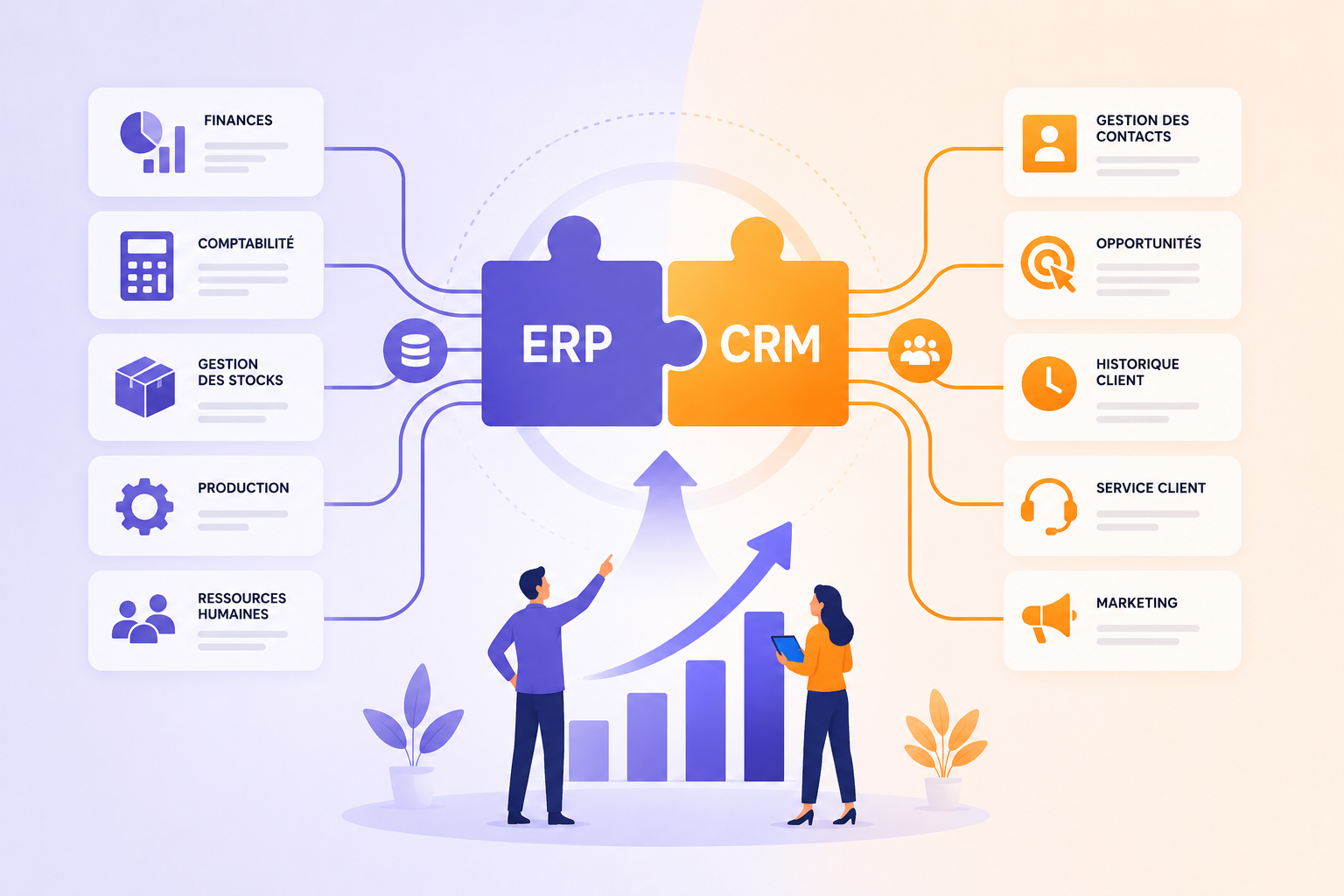
CRM ERP integration connects your customer relationship management system (sales, marketing, customer service) with your enterprise resource planning system (finance, inventory, production, billing). Customers, products, prices, orders and invoices then sync automatically. The result is one shared view of each customer, fewer manual re-entries and a faster path from quote to cash.
Key takeaways
- CRM ERP integration links the front office (sales, marketing, customer service) with the back office (finance, inventory, production, billing).
- Its main benefits are a complete customer view, less re-entry and fewer errors, faster sales cycles and more reliable forecasts.
- Integration runs through a native connector, custom APIs or an integration platform, once you have decided which system is the reference for each piece of data.
- Success depends as much on data quality and user adoption as on the technical connection.
ERP and CRM: What's the difference?
Before we delve into the benefits of combining them, let's review their respective roles.
An ERP (Enterprise Resource Planning) centralizes the management of a company's internal resources and processes: finance, purchasing, production, logistics, human resources, and supply chain.
A CRM (Customer Relationship Management) focuses on customer relationships. It enables the management of leads, sales opportunities, marketing campaigns, and customer follow-up.
ERP manages internal operations, while CRM handles external interactions. Together, they form the foundation of a truly data-driven company.
1. Centralize Data for a 360° View
One of the main advantages of ERP CRM integration is information centralization.
Teams have a single source of truth, bringing together:
- customer data;
- order history;
- invoices;
- contracts;
- commercial interactions;
- support data.
This comprehensive view facilitates decision-making and significantly reduces errors caused by information duplication.
2. Improve customer experience
Today, customers expect quick and personalized responses.
Thanks to an ERP-CRM connection, sales representatives instantly access relevant information:
- order status;
- purchase history;
- ongoing incidents;
- satisfaction level.
This allows them to provide accurate answers and offer a smoother experience at every stage of the customer journey.
3. Accelerate the sales cycle
When data flows automatically between systems, sales teams save valuable time.
Quotes, product availability, pricing conditions, and stock levels are accessible in real time.
Sales representatives can close deals faster and reduce processing times, which can improve revenue.
4. Reduce manual tasks
Without integration, employees often have to re-enter the same information into multiple applications.
This practice generates:
- a loss of time;
- data entry errors;
- data inconsistencies.
Automating data exchange between ERP and CRM secures processes and increases overall productivity.
5. Enhance team collaboration
Sales, marketing, finance, and operations teams often work with different objectives.
ERP CRM integration promotes better coordination through shared access to the same information.
This transparency improves internal communication and reduces friction between departments.
6. Optimize performance management
Having consolidated data provides more reliable indicators.
Decision-makers can track:
- revenue;
- profitability;
- sales performance;
- operational costs;
- service levels.
This visibility facilitates the identification of growth drivers and continuous process improvement.
7. Improve forecasting and planning
The quality of forecasts directly depends on the quality of available data.
By connecting ERP and CRM, the company gains a comprehensive view of business opportunities and operational capabilities.
Teams can better anticipate:
- production needs;
- supplies;
- required resources;
- market developments.
This ability to anticipate becomes a major competitive advantage.
8. Encourage digital tool adoption
The effectiveness of an ERP or CRM heavily depends on their actual use by employees.
Even the best solutions can fail if users encounter difficulties or do not understand the new processes.
This is why many companies complement their ERP CRM projects with a digital adoption platform (DAP) such as K-NOW. Contextual guidance supports users directly within their applications and facilitates the adoption of new tools.
This approach reduces resistance to change and accelerates the return on investment for digital projects.
Discover the digital adoption platform K-NOW
9. Secure change management
ERP CRM integration often involves new business processes.
Training therefore plays a crucial role in the project's success.
Through simulated environments like K-STUDIO, employees can train in realistic conditions without risk to data or operations.
This immersive approach improves user engagement and accelerates skill development.
Learn more about K-STUDIO
10. Measuring the ROI of Digital Transformation
Many companies invest in ERP and CRM projects without precise metrics on their actual adoption.
However, measuring tool usage is essential to identify friction points and optimize user journeys.
Analytics solutions like K-VALUE allow for objective tracking of:
- application adoption;
- user engagement;
- the impact of training initiatives;
- productivity gains.
Teams thus gain a clear understanding of the return on investment of their digital transformation.
Discover K-VALUE
How do you integrate an ERP and a CRM?
There are four main ways to connect the two systems. The right one depends on the number of data flows, data volumes and the maturity of your information system:
- Native connector: provided by the ERP or CRM vendor, it covers standard flows (customers, items, orders). Quick to set up, it is less flexible for specific processes.
- Custom API integration: built to fit your business rules, it requires development skills and maintenance every time either application is upgraded.
- Integration platform or middleware: an intermediate layer (iPaaS, enterprise service bus) manages flows between the ERP, the CRM and other applications. IBM recommends this approach over a pile of one-off, point-to-point connections.
- Single suite: one vendor covers ERP and CRM on a shared database, which removes some interfaces at the cost of stronger dependence on that vendor.
Also decide how often data syncs: in real time for time-sensitive data (inventory, order status), in scheduled batches for the rest. For the technical side of the project, see our article on the role of the software integrator.
Challenges to anticipate during an ERP CRM integration
While the benefits are numerous, certain areas require attention.
Among the main challenges:
- the quality of existing data;
- information governance;
- access rights management;
- change management;
- user training.
A user experience and digital adoption-centric approach generally helps secure these projects and maximize their benefits.
Which data should you sync between ERP and CRM?
Before any development, list the data you will exchange and decide which system is the reference for each. The split below is the most common; adapt it to your processes:
| Data | Usual system of record | Direction of flow |
|---|---|---|
| Leads and opportunities | CRM | Stay in the CRM |
| Customer accounts | CRM at creation, ERP for billing data | Both ways |
| Items, price lists and terms | ERP | ERP to CRM |
| Inventory and availability | ERP | ERP to CRM |
| Quotes and orders | CRM for the quote, ERP for fulfillment | CRM to ERP, then status back to the CRM |
| Invoices, payments, outstanding balances | ERP | ERP to CRM |
Document these choices in a reference shared by IT, sales and finance: they drive deduplication rules, access rights and data-quality checks. They also shape training, since sales reps need to know which fields they can edit in the CRM and which ones come from the ERP. Finally, run a data-cleansing pass before the first synchronization: duplicate accounts or outdated price lists copied from one system to the other undermine trust in the integrated data from day one.
ERP CRM: a strategic duo for sustainable growth
Integrating ERP and CRM is no longer just an IT project. Today, it's a true performance driver for companies looking to gain agility, improve their customer experience, and accelerate growth.
By connecting business and customer data, organizations gain a unified view that facilitates decision-making, strengthens collaboration, and optimizes processes.
However, success doesn't rely solely on technology. User adoption remains the key success factor. Combining ERP CRM integration with a Digital Employee Experience (DEX) approach, contextual guidance solutions, immersive training, and adoption analytics transforms a technical project into a true competitive advantage.
Companies that invest today in this comprehensive approach will be best positioned to meet the challenges of tomorrow's digital transformation.
Frequently asked questions
What is a unified CRM?
A unified CRM brings together, in one tool or one view, everything you know about a customer: sales interactions, marketing campaigns and service requests, but also orders, invoices and payments from the ERP. You get there either with a suite that covers these functions on a shared database, or through CRM ERP integration, which feeds the CRM with back-office data.
What is an ERP CRM connector?
An ERP CRM connector is a ready-made module that automatically syncs selected data between the two applications: customer accounts, items, prices, orders and invoices. It is provided by one of the vendors or by an integration platform. It reduces custom development, but check that it covers your flows and business rules, and plan for its maintenance at each upgrade.
Should you buy an ERP with built-in CRM or connect two systems?
A single suite simplifies your architecture and often suits organizations with simple sales processes. Two specialized systems connected together are better when sales, marketing or service need advanced features, or when the ERP is already in place. The decisive factor remains the quality of the shared data. Our CRM vs ERP comparison details the differences between the two tools.
Which ERP systems unify CRM, accounting and inventory?
Several vendors cover CRM, accounting and inventory in one family of applications, for example Microsoft Dynamics 365 (Sales and Customer Service on the CRM side, Business Central or Finance and Supply Chain Management on the ERP side), Oracle NetSuite or Odoo. Large organizations more often connect a leading CRM to an ERP such as SAP S/4HANA or Oracle Fusion Cloud ERP.
Who should lead a CRM ERP integration project?
The project is usually led by the IT department with business co-owners from sales and finance or order management, since the rules for customers, prices and orders concern them directly. An integrator often builds the interfaces. Also appoint data owners who validate sync and deduplication rules over time.