
A CMMS (computerised maintenance management system) is software that centralises everything a maintenance team needs to keep equipment running: the asset register, work orders, preventive maintenance schedules, spare parts inventory and performance reports. It replaces paper, spreadsheets and scattered emails with one shared database, so teams can plan work, reduce breakdowns and prove what was done.
Key takeaways
- CMMS stands for computerised (or computerized) maintenance management system: software that plans, tracks and documents maintenance work on physical assets.
- Its core features are work order management, preventive maintenance scheduling, an asset register, spare parts inventory, mobile access for technicians and reporting.
- A CMMS focuses on day-to-day maintenance; an EAM covers the full asset lifecycle, and an ERP maintenance module ties maintenance to finance and purchasing.
- Its value is measured with KPIs such as MTBF, MTTR, availability and PM compliance, which are only reliable if technicians record their work accurately.
- Choosing the right software matters, but technician adoption is what determines whether a CMMS project delivers results.
What is a CMMS? Meaning and definition
CMMS meaning: CMMS stands for computerised maintenance management system (spelled "computerized" in US English). It is a software application that helps organisations manage and optimise the maintenance of their physical assets: production machines, buildings, vehicles, networks, medical or IT equipment.
In practice, a CMMS centralises in a single database all the equipment to be maintained, the history of every intervention, the preventive maintenance plans and the spare parts inventory. Each department can enter or consult the information it needs through a shared interface: production reports a fault, the maintenance planner schedules the job, the technician closes the work order on a tablet, and the manager follows costs and indicators on a dashboard.
Because it gives a complete and up-to-date view of maintenance operations, a CMMS is also a decision-making tool: it shows which assets fail most often, where maintenance budgets go and which preventive tasks are overdue.
What is CMMS software in one sentence?
CMMS software is the digital system of record for maintenance: it tells the team what assets they have, what work needs to be done, who does it, with which parts, and what it cost.
A brief history of the CMMS
Maintenance was long managed with paper work orders, card files and later spreadsheets. The first computerised maintenance systems appeared on mainframe computers in the 1960s and 1970s and were reserved for large industrial organisations. They spread with personal computers and client-server software in the 1980s and 1990s, and today most solutions are available in SaaS mode with mobile apps, which has made CMMS accessible to organisations of every size.
How does a CMMS system work?
A CMMS organises maintenance around a simple cycle that repeats for every asset:
- Register the assets. Each piece of equipment is recorded in an asset hierarchy (site, building, line, machine, component) with its technical data, documents, warranty and criticality.
- Capture the need. A maintenance request comes from an operator, a sensor alert, an inspection or a preventive schedule that falls due.
- Plan and schedule. The request is converted into a work order with a priority, tasks, required skills, estimated time and spare parts. The planner assigns it to a technician or team.
- Execute. The technician receives the work order, often on a mobile device, consults the asset history and procedures, and performs the job.
- Close and record. The technician records time spent, parts used, the cause of failure and comments. Stock levels and costs are updated automatically.
- Analyse and improve. The data feeds reports and KPIs (MTBF, MTTR, backlog, costs), which are used to adjust preventive plans and investment decisions.
The quality of the whole cycle depends on step 5: if work orders are closed without accurate data, the history is incomplete and the indicators lose their value.
CMMS software features
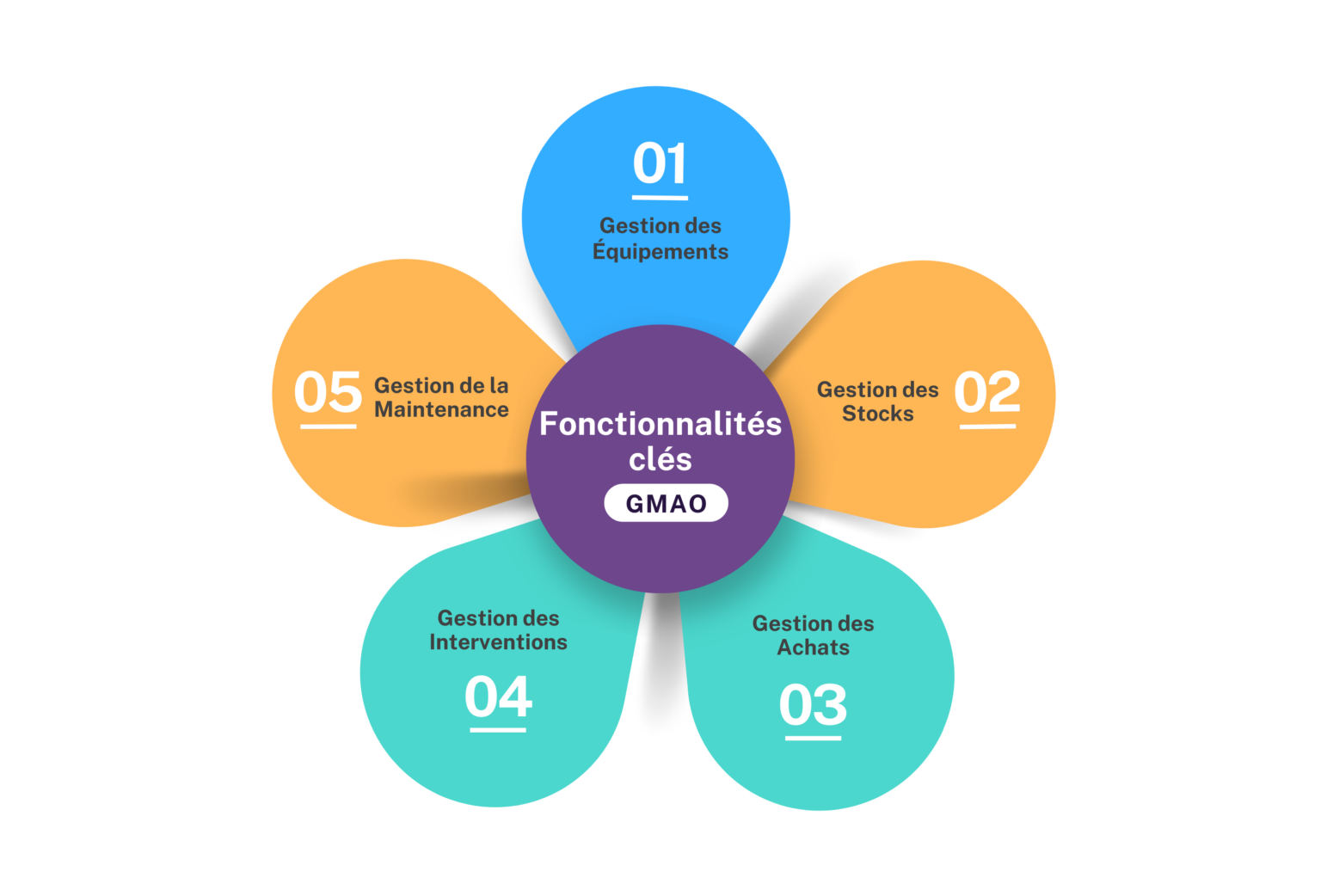
CMMS products differ in depth and ergonomics, but most are organised around the same core modules.
| Feature | What it does | Main users |
|---|---|---|
| Asset register | Lists all equipment with technical specifications, location, hierarchy, documents, plans, warranty and full maintenance history. | Maintenance engineers, planners |
| Work order management | Creates, prioritises, assigns and tracks corrective and planned jobs, from the initial request to closure. | Planners, technicians, supervisors |
| Maintenance requests | Lets production or building occupants report a fault, which is qualified and turned into a work order. | Operators, occupants, help desk |
| Preventive maintenance scheduling | Triggers recurring tasks by calendar, meter reading (hours, cycles, kilometres) or condition threshold. | Planners, maintenance managers |
| Spare parts inventory | Tracks stock levels, locations and consumption, sets reorder points and reserves parts for planned jobs. | Storekeepers, planners |
| Purchasing | Generates purchase requests for parts and subcontracted services based on needs and stock levels. | Buyers, storekeepers |
| Mobile app | Gives technicians their work orders, checklists, asset history and procedures on a smartphone or tablet, often with QR code or barcode scanning. | Field technicians |
| Reporting and dashboards | Calculates KPIs (MTBF, MTTR, availability, backlog, costs) and produces audit trails for compliance. | Maintenance managers, management |
Many solutions add document management (manuals, drawings, permits), skills and certification management, budget and cost tracking, and connections to IoT sensors or to the company's ERP. The purchasing module is often linked to the wider procurement information system.
CMMS and maintenance types: corrective, preventive, predictive
A CMMS supports every maintenance strategy. The European standard EN 13306 distinguishes two main families, corrective and preventive maintenance, and preventive maintenance itself can be time-based or condition-based, with predictive maintenance as a form of condition-based maintenance.
| Maintenance type | Trigger | Role of the CMMS |
|---|---|---|
| Corrective (reactive) | A failure or malfunction has occurred. | Records the request, prioritises the work order, gives access to history and parts, documents the cause of failure. |
| Preventive, time-based | A fixed interval: calendar date or usage (hours, cycles, kilometres). | Generates work orders automatically when the interval falls due and tracks PM compliance. |
| Condition-based | A measured parameter crosses a threshold (vibration, temperature, pressure, wear). | Receives readings from inspections or sensors and creates a work order when a threshold is reached. |
| Predictive | An analysis of condition data forecasts a likely failure. | Stores the history needed for analysis and turns predictions into planned work orders, often with dedicated analytics tools. |
For most organisations, the first gain from a CMMS is moving from mostly corrective work to scheduled preventive maintenance. To compare the two proactive approaches in more detail, read our guide on preventive vs predictive maintenance.
CMMS vs EAM vs ERP maintenance module
CMMS, EAM and ERP are often confused because their functions overlap. The difference lies mainly in scope.
| Criterion | CMMS | EAM (enterprise asset management) | ERP maintenance module |
|---|---|---|---|
| Scope | Day-to-day maintenance operations | Full asset lifecycle: planning, acquisition, operation, maintenance, disposal | Maintenance as one process within the whole company system |
| Main users | Maintenance teams and technicians | Maintenance, asset managers, finance, management | Maintenance, finance, purchasing, controlling |
| Strengths | Fast to deploy, focused, usually simple for technicians | Multi-site, lifecycle costs, capital planning, compliance | Native link with finance, purchasing, inventory and HR data |
| Typical fit | SMEs, single sites, facilities and maintenance departments | Asset-intensive organisations: utilities, transport, energy, large industry | Companies that already run their operations on that ERP |
| Watch-out | Limited financial and lifecycle view | Longer, more complex projects | Field ergonomics can be less suited to technicians than a dedicated tool |
An EAM includes the functions of a CMMS, and the boundary between the two is increasingly blurred as CMMS vendors add lifecycle features. Many organisations run a CMMS or EAM alongside their ERP and connect them through interfaces, so that work orders, parts consumption and costs flow into finance and purchasing.
Benefits of a CMMS
Once relegated to the background, maintenance has become a strategic function: unplanned downtime costs production, delays customers and can damage a company's reputation with its partners. A CMMS turns maintenance from reactive firefighting into a planned, measurable activity.
Less unplanned downtime and higher productivity
Machine productivity depends directly on uptime. By scheduling preventive tasks instead of waiting for breakdowns, a CMMS reduces unplanned stoppages. When a failure does occur, the tool alerts the right team immediately and gives technicians the history, procedures and parts availability they need, which shortens repair time.
Longer equipment life
Systematic preventive maintenance based on manufacturer recommendations, centralised records that reveal recurring failure points, documented work instructions that limit handling errors, and automatic alerts on wear or usage thresholds all help extend the useful life of assets and defer replacement investments.
Lower maintenance costs
Fewer emergency repairs, better-planned labour and optimised spare parts management (avoiding both overstocking and stock-outs) reduce costs. Analytical cost tracking per asset and per intervention also shows which equipment consumes the most budget. According to the Operations & Maintenance Best Practices Guide published for the US Department of Energy, a preventive maintenance programme can save 12% to 18% compared with a purely reactive approach.
Better work quality and safety
Detailed, illustrated procedures in the CMMS help technicians follow standardised methods for each type of equipment, limiting errors and omissions. Skills and certification management ensures that only qualified people work on sensitive equipment, and feedback from the field is used to improve procedures over time.
Traceability and compliance
Every intervention, planned or unplanned, is recorded with its date, technician, parts and results. This audit trail supports regulatory inspections, safety audits, insurance requirements and quality certifications, and helps identify recurring patterns or weaknesses.
Faster response to requests
Computerised maintenance requests are qualified and routed to the right team without delay. Planning periodic work in advance also smooths the workload of maintenance teams, leaving more capacity to absorb unforeseen events.
Maintenance KPIs: MTBF, MTTR, availability, PM compliance
A CMMS calculates maintenance indicators automatically, provided downtime, repair times and completed tasks are recorded correctly. Four indicators are used in almost every maintenance department.
| KPI | Definition | Formula |
|---|---|---|
| MTBF (mean time between failures) | Average operating time between two failures of a repairable asset. The higher, the more reliable the asset. | Total operating time ÷ number of failures |
| MTTR (mean time to repair) | Average time needed to restore an asset after a failure, including diagnosis, repair and testing. The lower, the better. | Total repair time ÷ number of repairs |
| Availability | Share of time the asset is able to operate, derived from reliability and repair time. | MTBF ÷ (MTBF + MTTR) |
| PM compliance | Share of scheduled preventive work orders completed on time (within the tolerance window defined by the organisation). | PM work orders completed on time ÷ PM work orders scheduled × 100 |
Worked example: over a 30-day period (720 hours), a pump fails 3 times and the three repairs take 6 hours in total. Operating time is 714 hours, so MTBF = 714 ÷ 3 = 238 hours, MTTR = 6 ÷ 3 = 2 hours and availability = 238 ÷ (238 + 2) ≈ 99.2%.
Other common indicators include maintenance backlog (outstanding work in hours or weeks), planned maintenance percentage (share of maintenance hours spent on planned work) and maintenance cost per asset. Choose a small set of KPIs linked to your objectives rather than tracking everything.
Which industries use a CMMS?
A CMMS is useful wherever there are physical assets to maintain:
- Manufacturing: planning work on production lines, tracking costs and maximising the availability of production assets.
- Environment and utilities: maintaining water treatment plants, waste facilities and water, electricity or gas networks, with high availability, HSE compliance and full traceability.
- Real estate and facility management: keeping buildings, HVAC, lifts and safety systems running for occupants, and supporting regulatory checks.
- Public sector: managing road infrastructure, public buildings and vehicle fleets, with budget tracking of maintenance spending.
- Healthcare: maintaining technical, biomedical and IT equipment in hospitals, where safety and availability are critical.
- Transport and logistics: maintaining rolling stock, vehicles, warehouses and handling equipment.
Examples of CMMS software
The market ranges from mobile-first tools for small teams to enterprise EAM suites. The solutions below are listed in alphabetical order as examples, without ranking.
- Carl Source (CARL Software, Berger-Levrault group): CMMS and EAM solution used in industry, transport, healthcare, real estate and the public sector.
- Fiix (Rockwell Automation): cloud-based CMMS for work orders, preventive maintenance, parts and reporting.
- HxGN EAM (Hexagon, formerly Infor EAM): enterprise asset management solution for asset-intensive organisations.
- IBM Maximo (IBM Maximo Application Suite): EAM platform covering asset management, maintenance, monitoring and predictive maintenance.
- Limble: cloud-based CMMS with mobile apps, aimed at maintenance and facilities teams.
- MaintainX: mobile-first maintenance and work order platform for frontline teams.
- SAP PM (Plant Maintenance, part of SAP's asset management offering in SAP S/4HANA): maintenance module integrated with SAP's finance, purchasing and inventory processes.
- UpKeep: mobile-first CMMS for work orders, assets and preventive maintenance.
The right choice depends on your size, your number of sites, your existing systems and how your technicians work, rather than on any general ranking.
How to choose a CMMS
A large number of solutions are available. The chosen solution must address your specific maintenance challenges while fitting your existing technical and human environment.
| Criterion | Questions to ask |
|---|---|
| Functional coverage | Does it cover the modules you need now (work orders, PM, inventory, purchasing) and those you will need later (multi-site, condition monitoring)? |
| Deployment mode | SaaS offers online access, automatic updates and often a lower upfront cost; on-premise offers more control but requires more IT effort. |
| Mobile and field ergonomics | Can a technician find an asset, read its history and close a work order in a few taps, including offline? |
| Integration | Does it offer a documented public API and connectors to your ERP, purchasing system, sensors or BMS? |
| Scalability | Can it handle your number of assets, users and sites, and adapt to new processes? |
| Vendor support | Is responsive support available in your language and time zone? Is there an active user community? |
| Total cost of ownership | Beyond licences or subscriptions: data migration, configuration, interfaces, training and ongoing administration. |
Involve future users, including technicians, in demos and test scenarios: a tool that is easy to use in the field will be adopted faster and will produce more reliable data.
How to implement a CMMS and get technicians to use it
Deploying a CMMS is as much a change management project as a software project. It introduces new working methods, and users need to see quickly how the tool simplifies their daily work.
Key implementation steps
- Define objectives and scope: target KPIs, sites, asset families and processes included in the first phase.
- Structure the asset hierarchy and clean up existing data (equipment lists, history, spare parts) before migration.
- Configure processes: request and work order workflows, priorities, preventive plans, failure codes, approval rules.
- Connect the CMMS to the ERP, purchasing and other systems where needed.
- Train users by profile (planners, technicians, storekeepers, managers) with practical exercises based on real cases.
- Go live progressively, site by site or asset family by asset family, with on-site key users to support colleagues.
- Measure usage and data quality, collect feedback and adjust configuration and training.
For a structured approach to the rollout itself, see the 8 steps to successfully implement new business software.
The deciding factor: technician adoption
Field technicians often work on tablets, across shifts and sites, and rarely have time for classroom training. When work orders are closed with missing times, parts or failure causes, asset history remains incomplete and KPIs such as MTBF and MTTR become unreliable. A CMMS only delivers its benefits if the people in the field use it correctly every day.
Effective adoption combines three moments:
- Before go-live: let technicians practise on a realistic replica of the CMMS, on PC or tablet, so they arrive confident on day one. K-STUDIO creates interactive simulations and training content from your own CMMS screens.
- At go-live and after: guide users directly inside the application, step by step, at the moment they create a request or close a work order. K-NOW, Knowmore's digital adoption platform, provides this in-app guidance and contextual help, and keeps it up to date when the software changes.
- Over time: measure how the tool is really used, for example the share of fully completed work orders per site, to target support where it is needed. K-VALUE provides these usage analytics.
Knowmore applies this approach to CMMS and EAM solutions such as Carl Source, IBM Maximo, HxGN EAM and SAP PM. Learn more on our use case page: CMMS software training and implementation.
FAQ
What does CMMS stand for?
CMMS stands for computerised maintenance management system, also spelled computerized maintenance management system. It refers to software that helps organisations plan, track and document the maintenance of their physical assets. A CMMS centralises the asset register, maintenance requests, work orders, preventive schedules, spare parts and maintenance history, and calculates indicators such as MTBF, MTTR and equipment availability.
What is an example of a CMMS system?
Examples of CMMS and related maintenance software include Carl Source, Fiix, Limble, MaintainX and UpKeep, while IBM Maximo, HxGN EAM and SAP PM are often used by larger, asset-intensive organisations that need enterprise asset management capabilities. A typical use is a manufacturing plant scheduling preventive tasks on its production lines and having technicians close work orders on tablets.
Is SAP a CMMS or an ERP?
SAP is primarily an ERP vendor. Its Plant Maintenance module (SAP PM), now part of SAP's asset management offering in SAP S/4HANA, provides CMMS-type functions such as equipment records, maintenance orders and preventive plans. Its strength is native integration with SAP finance, purchasing and inventory. Some organisations use SAP PM on its own, while others pair SAP with a dedicated CMMS or EAM for field users.
What is the difference between CMMS and EAM?
A CMMS focuses on day-to-day maintenance operations: work orders, preventive maintenance, spare parts and maintenance history. An EAM (enterprise asset management) system covers the entire asset lifecycle, from planning and acquisition to operation, maintenance and disposal, with stronger financial and multi-site capabilities. An EAM therefore includes CMMS functions. SMEs and single sites often choose a CMMS, large asset-intensive organisations an EAM.
Is Excel a CMMS?
No. Excel can store an equipment list or a simple maintenance schedule, but it is not a CMMS. It does not generate work orders automatically, manage spare parts in real time, provide a mobile app for technicians, keep a reliable audit trail or calculate KPIs from recorded interventions. Spreadsheets can work for a handful of assets, but they become hard to maintain as the number of assets and users grows.
How much does CMMS software cost?
CMMS costs depend on the number of users, the modules chosen, the deployment mode and integration needs. SaaS solutions are usually sold as a monthly or annual subscription per user, while on-premise solutions rely on a licence plus a maintenance contract. The budget should also include data migration, configuration, interfaces with the ERP and training, which often decide the success of the project.